We tried on tattoos with AI: they looked real, but size and side were hard to control
Give an AI image tool a photo of your arm and a tattoo design, ask it to put the design on your forearm, and in under a minute you get a picture that looks like a real, healed tattoo. We ran 32 of these try-ons to find out what that picture gets right, and what you can't control with words.
The idea is simple, and more and more people try it: instead of picturing a design on a stranger, see it on yourself. The catch is that a generative AI doesn't paste your design onto your photo. It draws a new picture that resembles both, and that difference decides what the result is good for.
What AI genuinely gets right
The realism is not hype. In our test every forearm result read as a real tattoo: the skin's texture showing through the ink, arm hair crossing the lines, the slight blue-green cast that healed black ink takes on, the design bending with the arm. Tattoo artists see the same. Images like these "look like they're real photos of tattoos on skin," says Dawn Richards of Kids Love Ink in London (Stories & Ink, 2025), and Natasha Thompson of Bleeding Hearts in Nottingham says some clients "can't tell the difference between an AI-generated image and a real one" (BBC via Resultsense, 2025).
No try-on app, ours included, relights skin that convincingly. That is exactly why the rest of this article matters: a picture that looks this real is also very good at hiding what it got wrong. "The human mind often looks at things and doesn't see mistakes," says Lal Hardy, a London tattooist of 47 years (LADbible, 2026).
Our test: 32 try-ons, three designs
We used a current general-purpose AI image editor and asked plainly, the way most people would: "Put the tattoo design from the second image on the inner forearm in the first photo. Make it about 8 cm tall." The photos of people and arms were generated by AI too, so no real person appears below. The designs were three of our own from tattoo designs by style: a snake and peony, a pocket watch with a rose, and the lettering "Amor Eterno". Each picture took about 40 seconds.
The design came through well. At a glance all three kept their composition: the snake's coils, the peony, the pocket watch and the rose, and the lettering, spelled correctly both times. Up close, small details drifted: in one version the snake came out darker, with less of its pale belly pattern, and the watch lost its hands while its gears were arranged differently. For most people that matters little; if an artist will work from the picture, bring them the original file anyway.
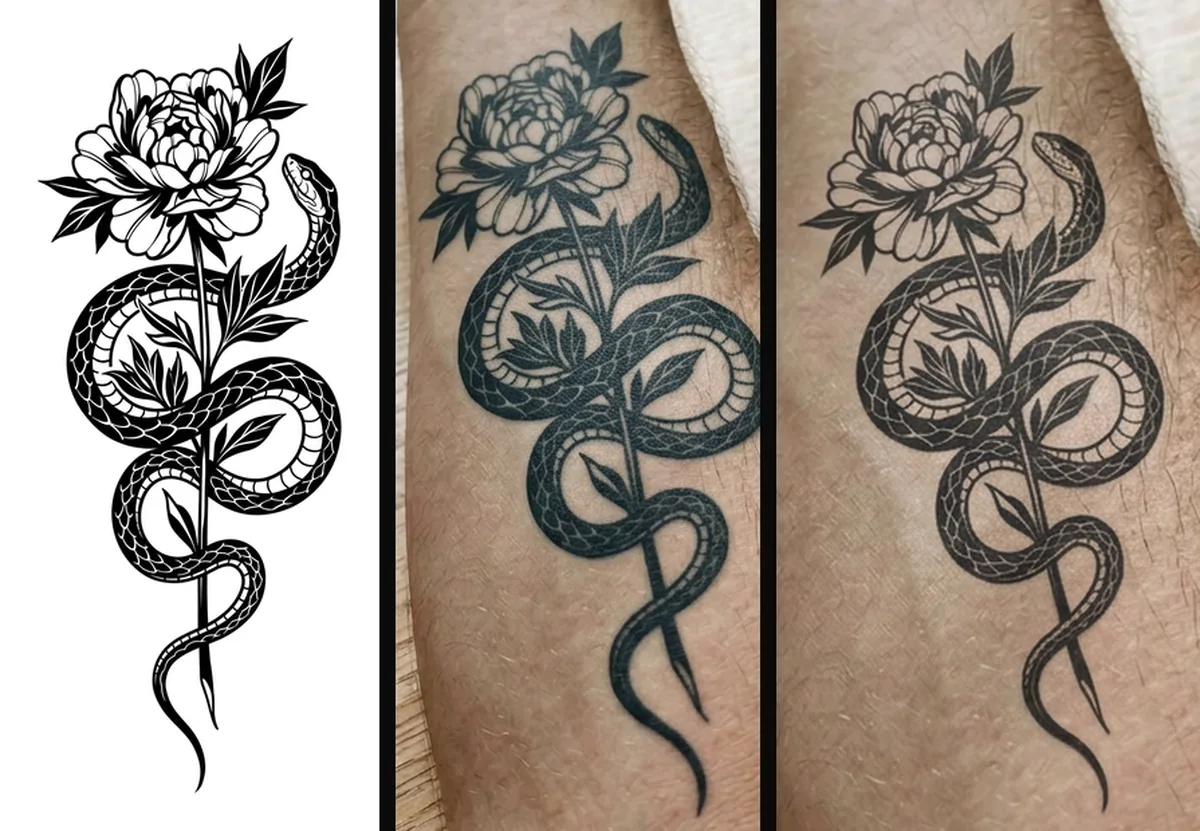
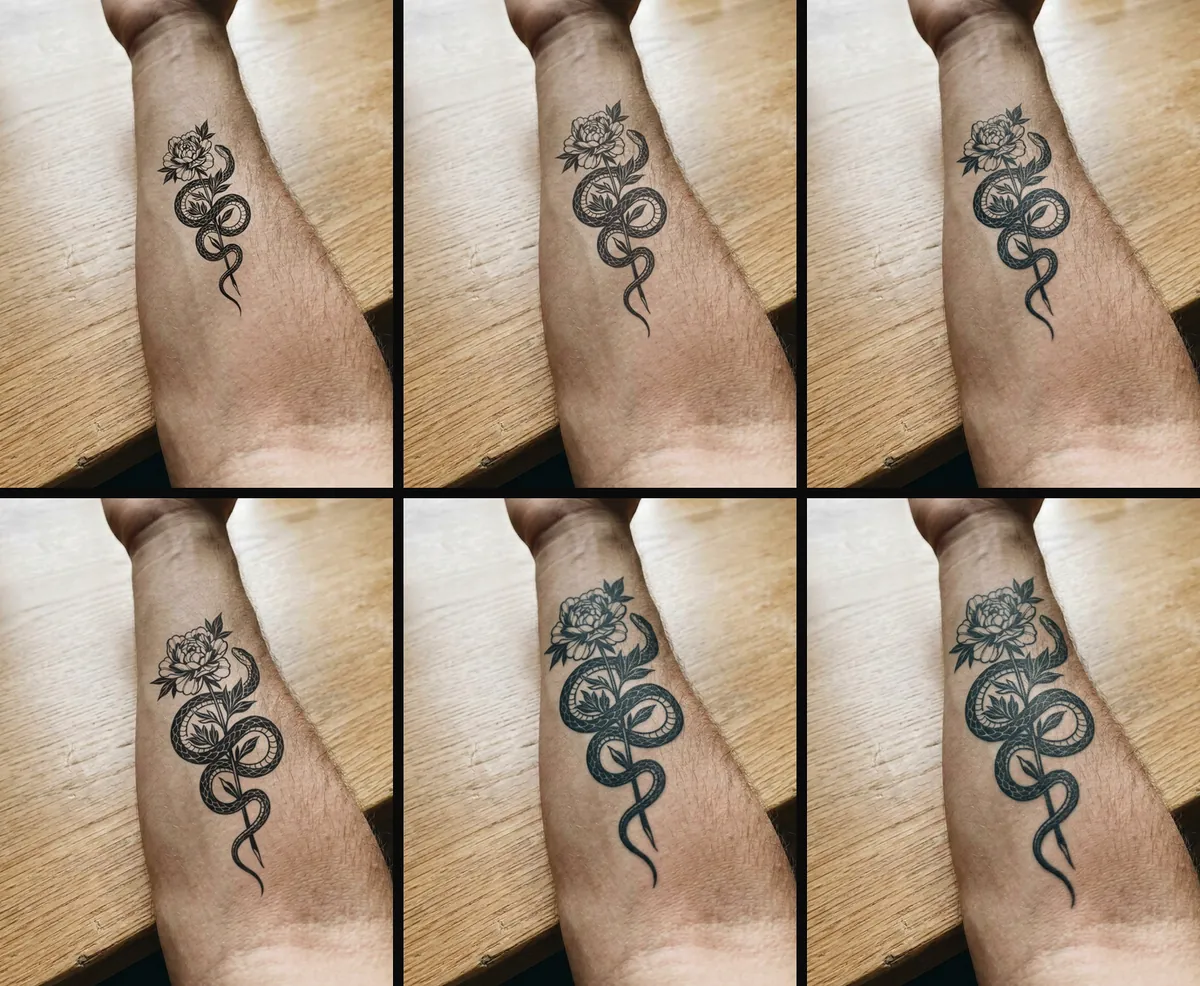
The same words gave different sizes. Six identical requests for "about 8 cm" produced tattoos from 28% to 52% of the photo's height: the largest almost twice the smallest. The AI does tell "about 3 cm" from "about 15 cm", but a number in a sentence is a suggestion, not a ruler. Asked afterwards to "move the tattoo about 3 cm closer to the wrist, change nothing else", it didn't move the tattoo at all, twice; it only redrew the whole picture again.
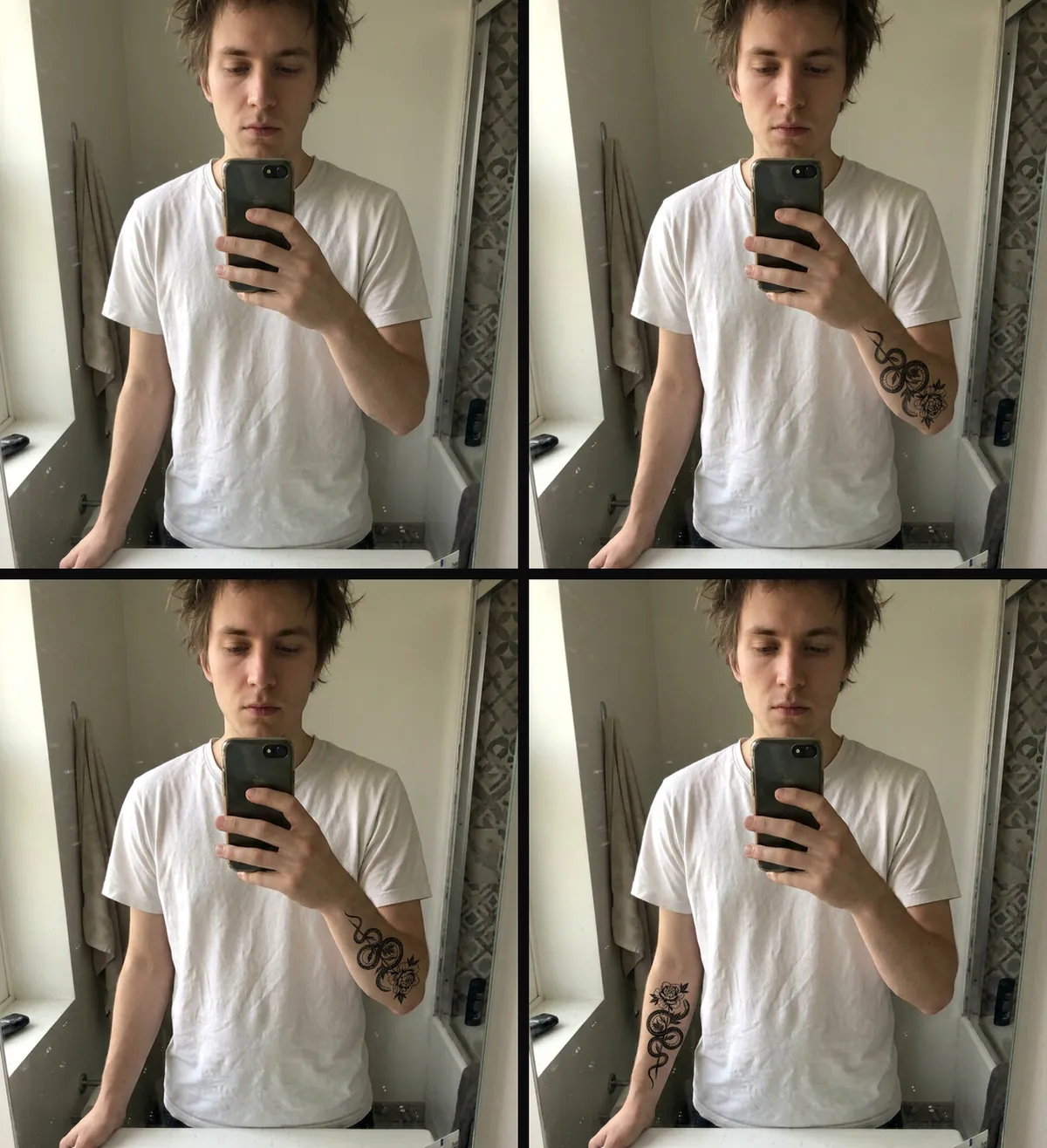
Left and right depend on the photo. With a person facing the camera, the AI put the tattoo on their left arm correctly three times out of three. In a mirror selfie it went onto the wrong arm in four attempts out of six: on the hand holding the phone, which is the person's right but sits on the side where a left arm would be in an ordinary photo. In a photo taken from behind it chose the right side twice out of three; and because a tank top covered the shoulder blade we had asked for, it quietly moved the tattoo to the back of the shoulder instead.
A test this small proves little on its own, and these tools change every few months. But the patterns match what others have reported, and the most persistent ones come from how the method works, not from a bug that the next version will fix.
What others ran into
In September 2025, Mitja Rutnik of Android Authority asked Google's Gemini to put a tattoo on his left arm: "the AI got confused and placed the tattoo on my right arm instead of the left one as I asked," and "It took me quite a few tries with more detailed prompts to get this right." Along the way it trimmed his beard "for no apparent reason" and "decided to give me a sunburn on my face", and "The more changes the AI made, the grainier the image became" (Android Authority). A reviewer at Quantslant asked for a 7 cm fox in October 2026 and got one "larger than the requested 7 cm", with leaves redrawn so that the result "isn't a 1:1 copy of the design" (Quantslant).
The makers say as much themselves. OpenAI's own guide to its image models warns that "Repeated edits can still change details you intended to preserve", and its example of a clothing try-on has to spell out "Do not change her face, facial features, skin tone, body shape, pose, or identity in any way" (OpenAI Cookbook). On size, the same guide notes that camera settings in a request "are treated as cues for appearance, not exact physical simulation."
There is one more limit that matters for tattoos in particular. Users report that photos showing a lot of skin are often refused by the safety filters (OpenAI Community, 2025), which hits the ribs, hips, chest and thighs, exactly the places where people most want to see a tattoo first.
The hidden costs: time, limits and your photo
A try-on is rarely one picture. Every change, a little smaller, further down, the other arm, is a new generation: in our test about 40 seconds each, and a new roll of the dice every time. Free plans cap how many images you can make, and the caps aren't published as numbers.
And the photo leaves your phone. On OpenAI's personal plans, sharing your chats to improve its models is switched on by default; you can switch it off in the data controls (OpenAI Help). Google says some Gemini chats are read by human reviewers and kept for up to three years, and asks: "Please don't enter confidential information that you wouldn't want a reviewer to see" (Gemini Apps Privacy Hub). For a photo of your ribs or thigh, that is worth knowing before you upload it.
What tattoo artists say
Many artists welcome an AI picture as a way to explain an idea. "It allows people to play around with the design that they have in their head," says Zachariah Davis of Urban Ink Tattoos in Sioux Falls (Dakota News Now, 2026). What they push back on is the picture as an order to copy. "These designs set unrealistic expectations for artists to copy… After all, we are people, not printers," says Thompson (BBC via Resultsense). Chris Dobransky of Alchemist Tattoo in Bismarck explains why the arm itself has the final say: "This works with the flow of this arm. The human arm has ways and things that go with the muscle" (KFYR-TV, 2026).
That is why artists still decide size and placement with a stencil on your skin, while you stand, sit and move. Whatever tool you use before that, its job is to get you to that appointment with a clear idea and an exact design.
How a try-on app is different
INKterest doesn't generate images. It puts the design you choose onto your own photo or your live camera, and you place it with your fingers: drag it, pinch it smaller or bigger, turn it, and in 2D tilt it. In 2D the design lies flat on the picture, on a photo or live through the camera; in 3D the app works out the shape of your body from a photo and wraps the design around it, which takes a few seconds once per photo. It finds where your skin is so the ink doesn't land on your clothes. In 2D and 3D everything happens on your iPhone and the photo is never uploaded; only 3D FAST and 3D Bodies send the photo you choose to our server, which doesn't keep it.
| AI image tool | INKterest | |
|---|---|---|
| Your design | Usually close; small details can change, and each try is drawn anew | Exactly your design, line for line |
| Size and position | Described in words; the same words give different results | Set with your fingers and seen at once |
| Left and right | Guessed from the photo; mirror selfies trip it up | You put it where you see it |
| Each change | Up to a minute, and a new picture | Instant; 3D needs a few seconds once per photo |
| Your photo | Sent to a server, and redrawn with the tattoo | In 2D and 3D, stays on your iPhone, unchanged |
| The look | Photographic: light, skin, a healed finish | Your design blended onto your skin, less photographic |
| New ideas | Can invent them | Shows the design you bring |
It has limits too, and they're worth saying plainly. The result is less photographic than the best AI pictures; our FAQ puts it as "a preview, not a promise": placement, size and proportion are what it gets right. In 2D a wide design on a rounded arm can look like a sticker, and 3D works from a still photo, not the live camera. Neither the app nor any AI knows real centimetres from a photo; the difference is that you judge the proportion against your own body yourself. It runs only on iPhone, and after 7 free try-ons it needs a PRO subscription.
If you use AI anyway
- Don't use a mirror selfie, or say which side of the picture you mean ("the arm on the left of the photo").
- Put the result next to your design and compare the details before you fall for it.
- Treat it as an idea, not a stencil: bring the original design to your artist, not the AI's version.
- Crop out your face and switch off model training in the app's settings before you upload a body photo.
- Expect several tries, and don't judge the size from any single one.
The right order: idea, exact design, try-on, artist
AI is good at the first step: trying ideas you couldn't draw yourself. Then settle on one exact design, ideally drawn by your artist or chosen from a real flash. Try that design on yourself to choose the placement and the size, whether on a photo or live. And let the artist make the final call with a stencil on your body. Our guides to taking an AI design to your artist, testing a tattoo before you get it and choosing the placement and size go further on each step.
- Our test: 36 AI generations (4 base photos and 32 try-ons and edits) with a current general-purpose AI image editor, 25 November 2026. The photos of people were generated by AI; the designs are from inkterest.app/tattoo-designs.
- Mitja Rutnik, Android Authority, 13 September 2025.
- Quantslant, AI tattoo design and try-on test, October 2026.
- OpenAI, prompting guide for its image models; data controls FAQ, seen 25 November 2026.
- Google, Gemini Apps Privacy Hub, updated 24 November 2026.
- Natasha Thompson, BBC via Resultsense, 29 October 2025; Dawn Richards, Stories & Ink, 17 July 2025.
- Lal Hardy, LADbible, 19 July 2026; Chris Dobransky, KFYR-TV, 21 April 2026; Zachariah Davis, Dakota News Now, 6 August 2026.
AI tools change often; this reflects them as of November 2026.
See your own design on you
INKterest is free to download for iPhone, with 7 free try-ons and no account. INKterest Pro unlocks unlimited try-ons.